HubSpot vs Salesforce (2026): I Built the Same Pipeline in Both

Most HubSpot vs Salesforce articles read like they were written from each vendor's marketing page. This one isn't. I signed up for both — HubSpot's free tier and a Salesforce Starter trial — built the same 12-deal pipeline in each with the same made-up companies, and wrote down what actually happened: how long setup took, how many fields each one forced me to fill, where the automation hides, and what the pricing screens really say. Everything below is from those two accounts, checked in August 2026.
Full disclosure: we make nrtur, a CRM that competes with both of these. I tried to test fairly anyway, and I'll say plainly where each giant beats us: Salesforce's customization and forecasting go far deeper than nrtur's, and HubSpot's genuine free tier and built-in marketing tools are things we don't offer. If either of those is what you need, this comparison should help you pick between them — not push you toward us.
The 30-second verdict
- HubSpot if you're a small-to-midsize team that wants sales and marketing under one roof, a real free tier, and an approachable setup you can run without an admin.
- Salesforce if you have a genuinely complex sales process, need deep customization and forecasting, and have the budget and admin capacity to run an enterprise platform.
That's the summary. The rest of this piece is the evidence — because the interesting stuff is in the details neither vendor puts on the pricing page.
How I tested
I created a fresh account in each product, skipped the demo data, and built an identical pipeline: 12 deals across the same invented companies (Harborline Logistics, Tidewater Dental Group, Cedar & Vale Interiors, and so on), same amounts, $95,200 total in both. Then I timed and counted the everyday things — creating a deal, finding the automation builder, reading the pricing — so the comparison rests on numbers, not impressions.
Day 1: what setup actually feels like
Neither of these drops you straight into a working pipeline. Both walk you through a guided setup with an AI layer bolted on first — and that's worth knowing before you assume "HubSpot is the easy one."
HubSpot starts with a short form: what's your role, your company website, a few company details, then Create my account. Fine so far. Then it hands you to Breeze, its AI "Onboarding assistant" — a six-step chat that asks about your business and goals and offers to configure things for you. In my test it dragged; when I tried to leave it, HubSpot threw up a "Skip AI-assisted setup?" warning telling me I'd have to configure everything myself. Only after skipping did it load the pipeline and drop me into the workspace.
Salesforce is heavier at the door. You pick Google or a business email, then a "Where are you located?" screen asks you to agree to four separate legal agreements (Developer Main Service Agreement, Program Agreement, Main Service Agreement, and Slack's terms). Job title, company, size, phone. An email verification code. A "Setting up now…" wait. Then onboarding questions — "What brings you to Salesforce?", "Do any of these feel like familiar challenges?" — and finally it lands you on a Home dashboard, not a pipeline, with a three-step "Explore your apps" walkthrough and an Agentforce AI upsell panel down the side. You navigate to Opportunities yourself.
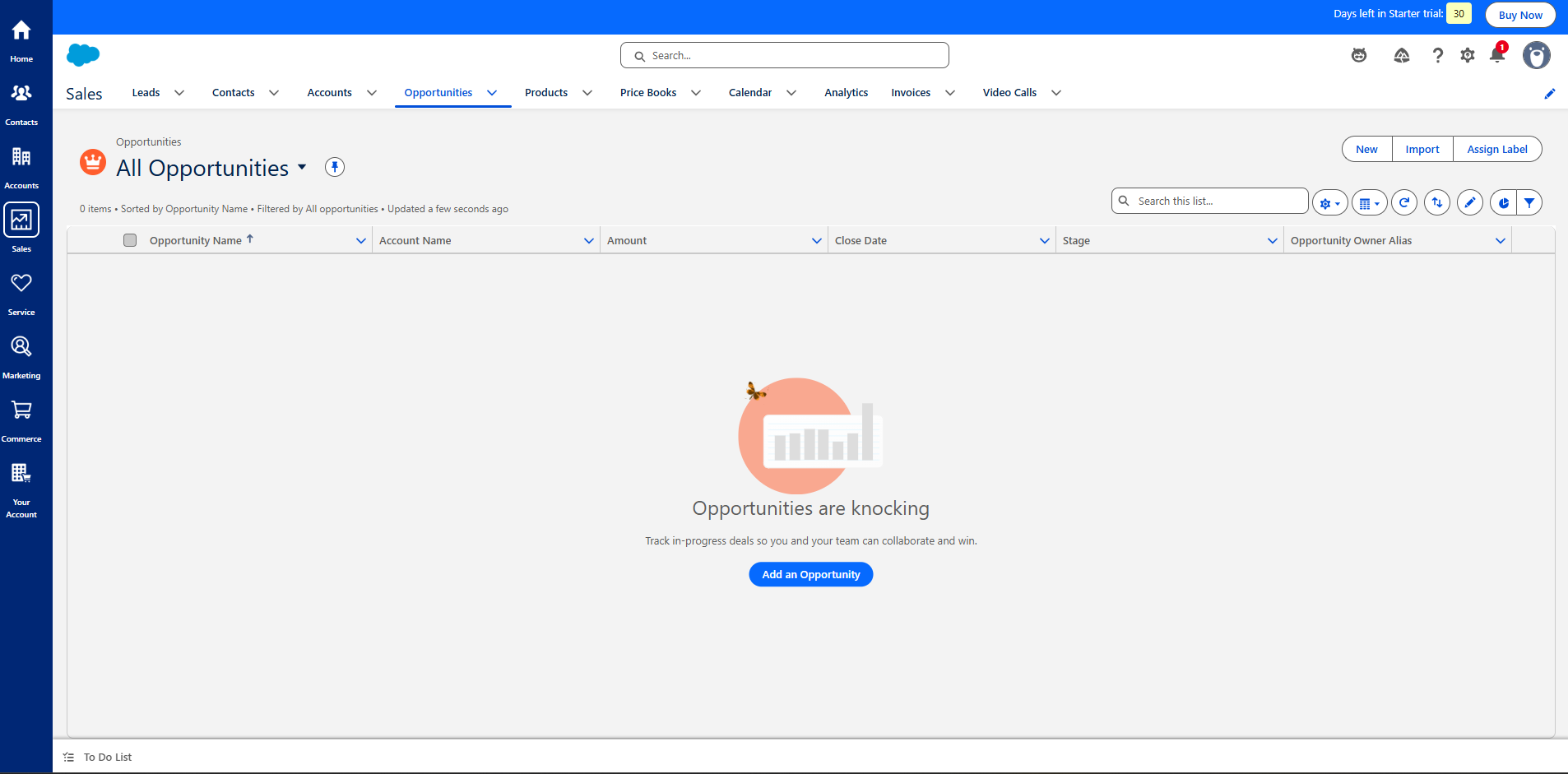
The honest read: both are long and guided, and both push an AI setup layer before you can work. That's the modern norm, not a Salesforce-only failing. HubSpot's is a touch smoother, but if you expected to log in and start selling in either one, you won't.
Creating your first deal: 1 field vs 5
This is where the two philosophies show up in a single screen.
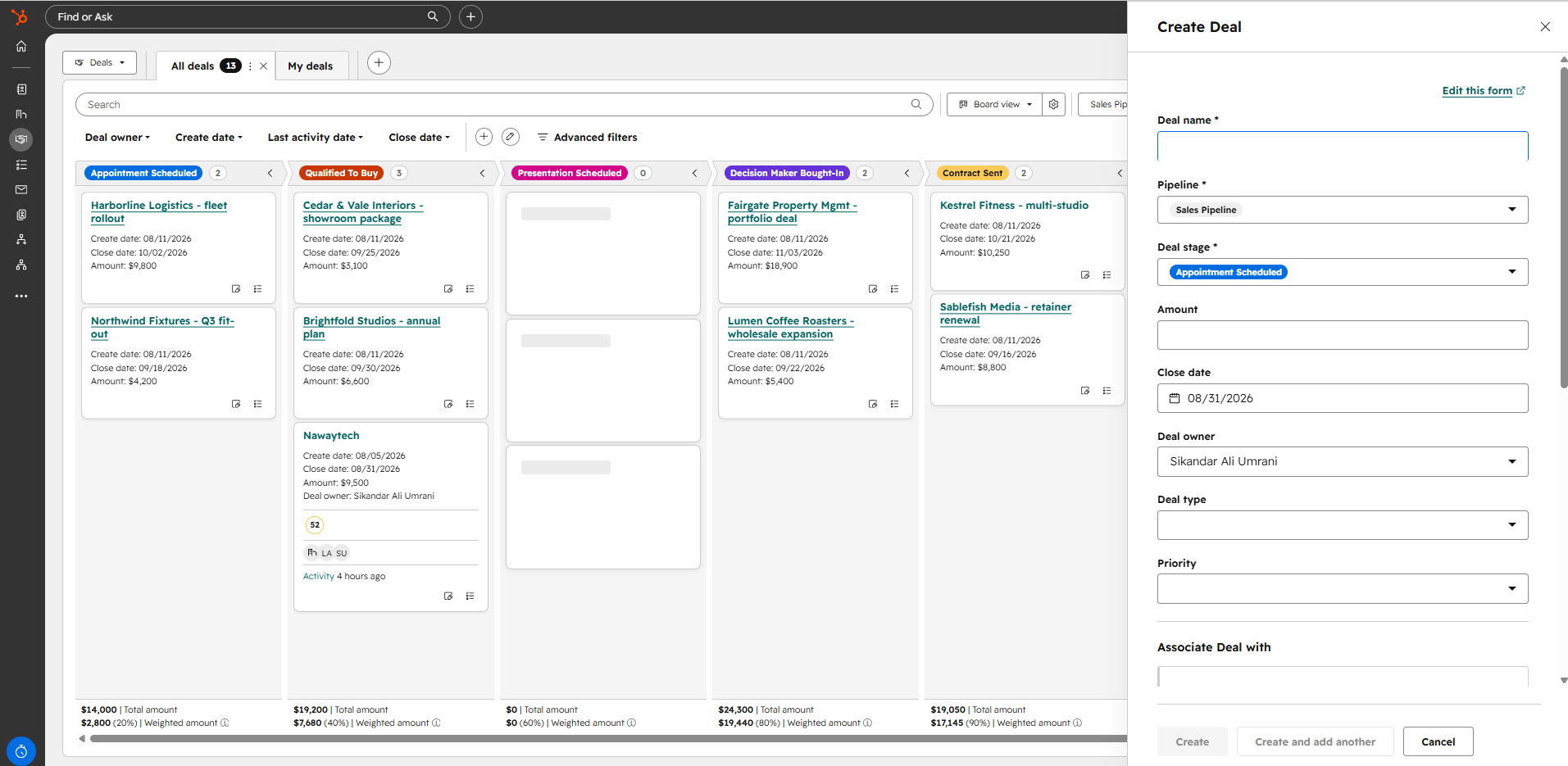
In HubSpot, creating a deal asks for essentially one field: the deal name. Pipeline and stage are pre-filled with sensible defaults, so you can save immediately.
In Salesforce, the New Opportunity form makes you fill five required fields, all empty: Opportunity Name, Account Name, Close Date, Stage, and Forecast Category. Leave one blank and it stops you with a red "Complete this field."
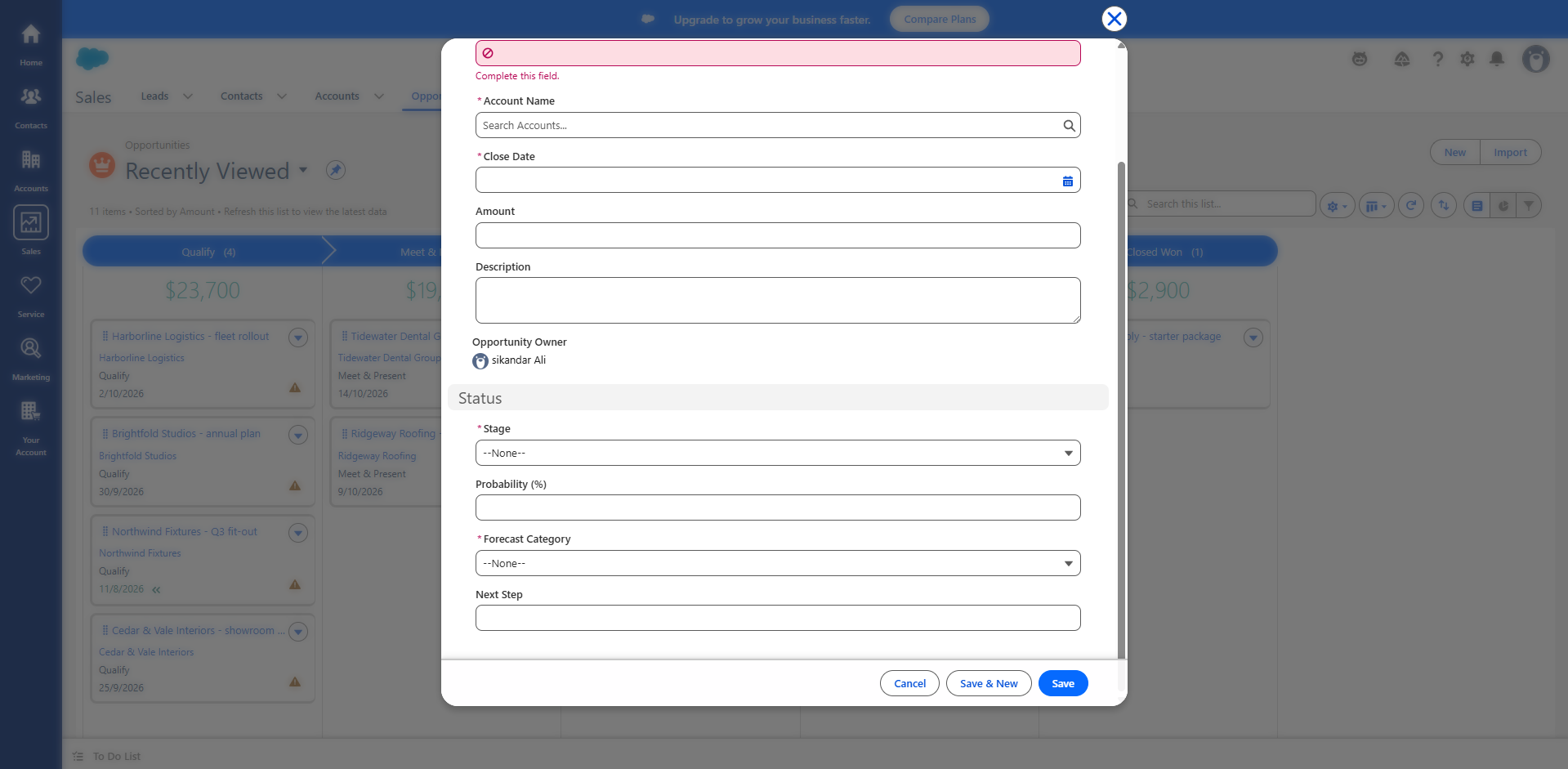
Here's the part that surprised me, though: it didn't actually take much longer. From clicking "new" to a saved deal was about 35 seconds in HubSpot and 38 in Salesforce — basically the same. So the fair conclusion isn't "Salesforce is slow to create a deal." It's that Salesforce makes you commit more structure up front. Whether that's discipline or friction depends on your team; a solo founder will find it fussy, a sales ops lead will call it good hygiene.
The pipeline board — and a difference nobody mentions
Both give you a drag-and-drop board. HubSpot's default pipeline has seven stages including both Closed Won and Closed Lost. Salesforce's default Opportunity board shows five path columns — Qualify, Meet & Present, Propose, Negotiate, Closed Won — and here's the catch: there's no Closed Lost column.
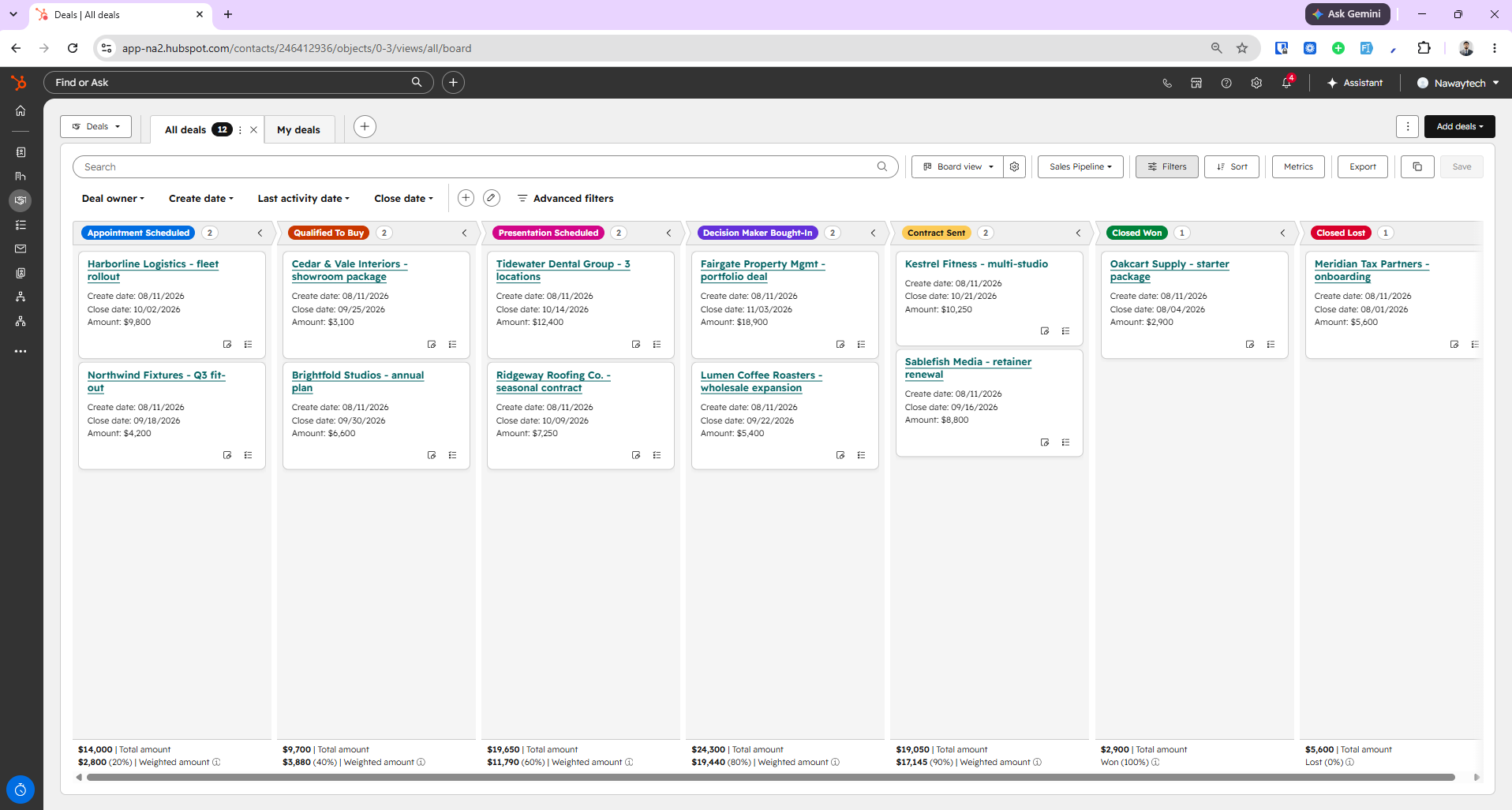
That means when you lose a deal in Salesforce, it simply disappears from the board. In my identical 12-deal test, HubSpot showed all 12 cards; Salesforce's board showed 11, because the lost deal (a tax-partner onboarding that fell through) dropped off entirely. The data's still there in the list view — but the board, the thing most reps actually stare at all day, quietly hides your losses.
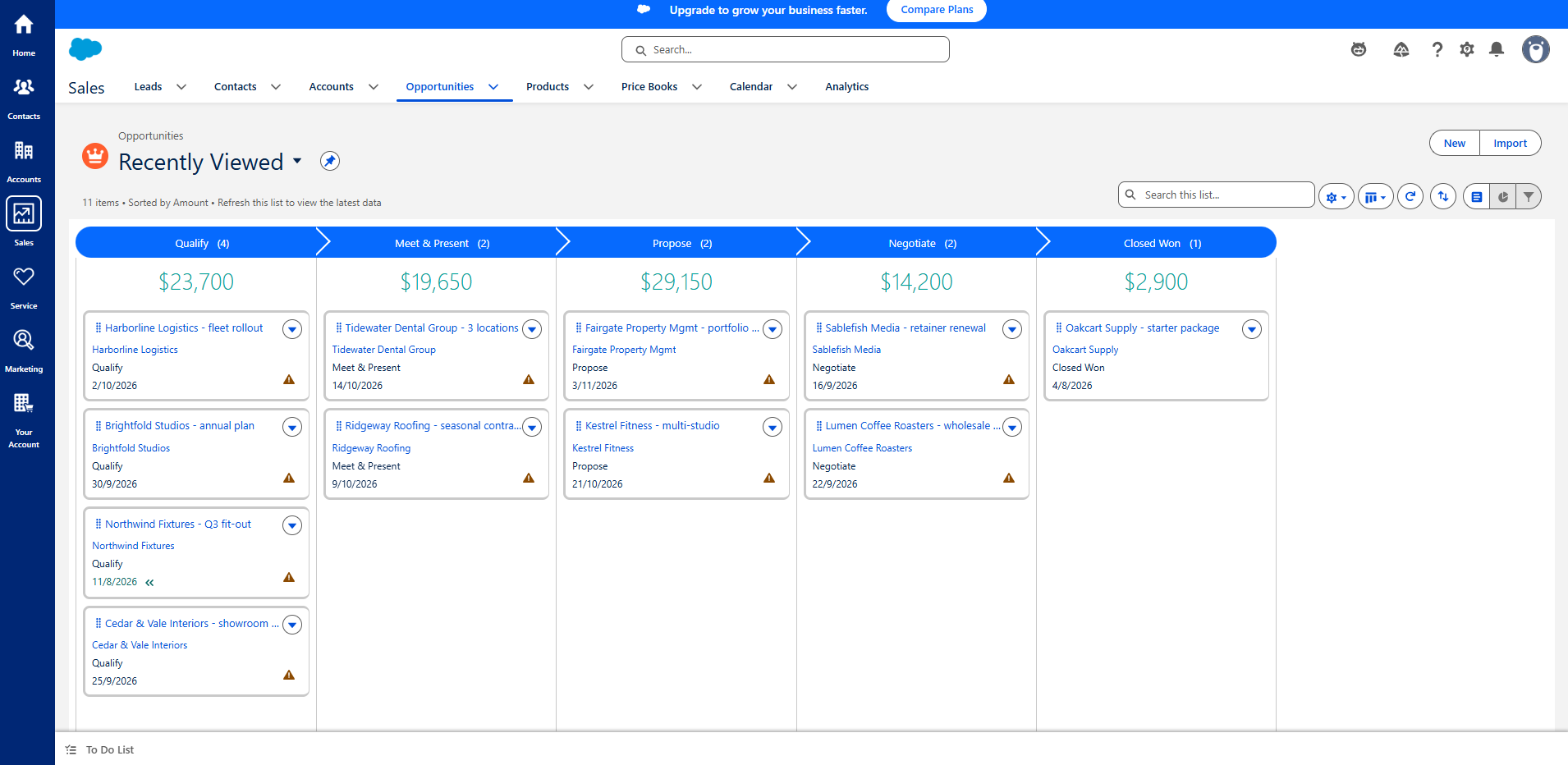
It's a small thing that says a lot about each product's defaults. HubSpot optimizes for "show me everything, including what I lost." Salesforce optimizes for a forward-moving sales path and expects you to build the lost-deal reporting yourself. Neither is wrong, but if you want loss visibility out of the box, that's a point for HubSpot.
Automation: easy to find isn't the same as easy to build
I went in expecting the cliché — HubSpot simple, Salesforce hard. The reality is more specific, and it corrects something a lot of comparisons (including our own older draft) get wrong.
Finding the automation tool is genuinely easier in HubSpot: it's right in the navigation (Automation → Workflows), about three clicks to a new build. In Salesforce, the automation builder is buried — Marketing → Process Automation → Flows → New Flow, roughly eight steps, and Flows are easy to lose among the dozens of other items on the way.
But building the automation is confusing in both. They use the same flow-builder model — steps, branches, delays on a canvas — and neither is "click-and-go." The first time you open either one, you're facing a learning curve.
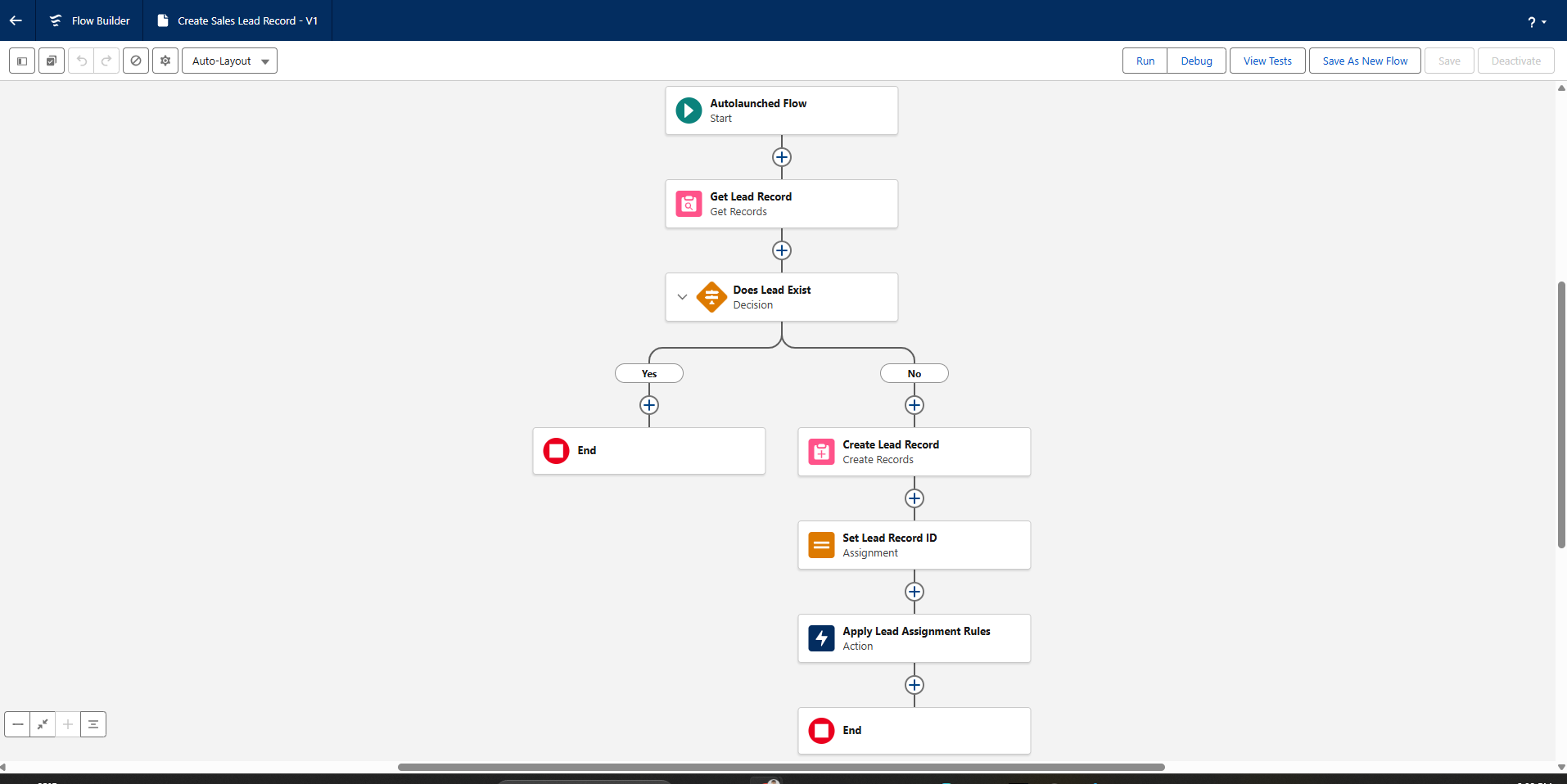
So the honest line is: HubSpot's automation is far easier to find and get to; the builder itself is a learning curve in both. Don't let anyone sell you HubSpot automation as effortless — it isn't, once you're past the templates.
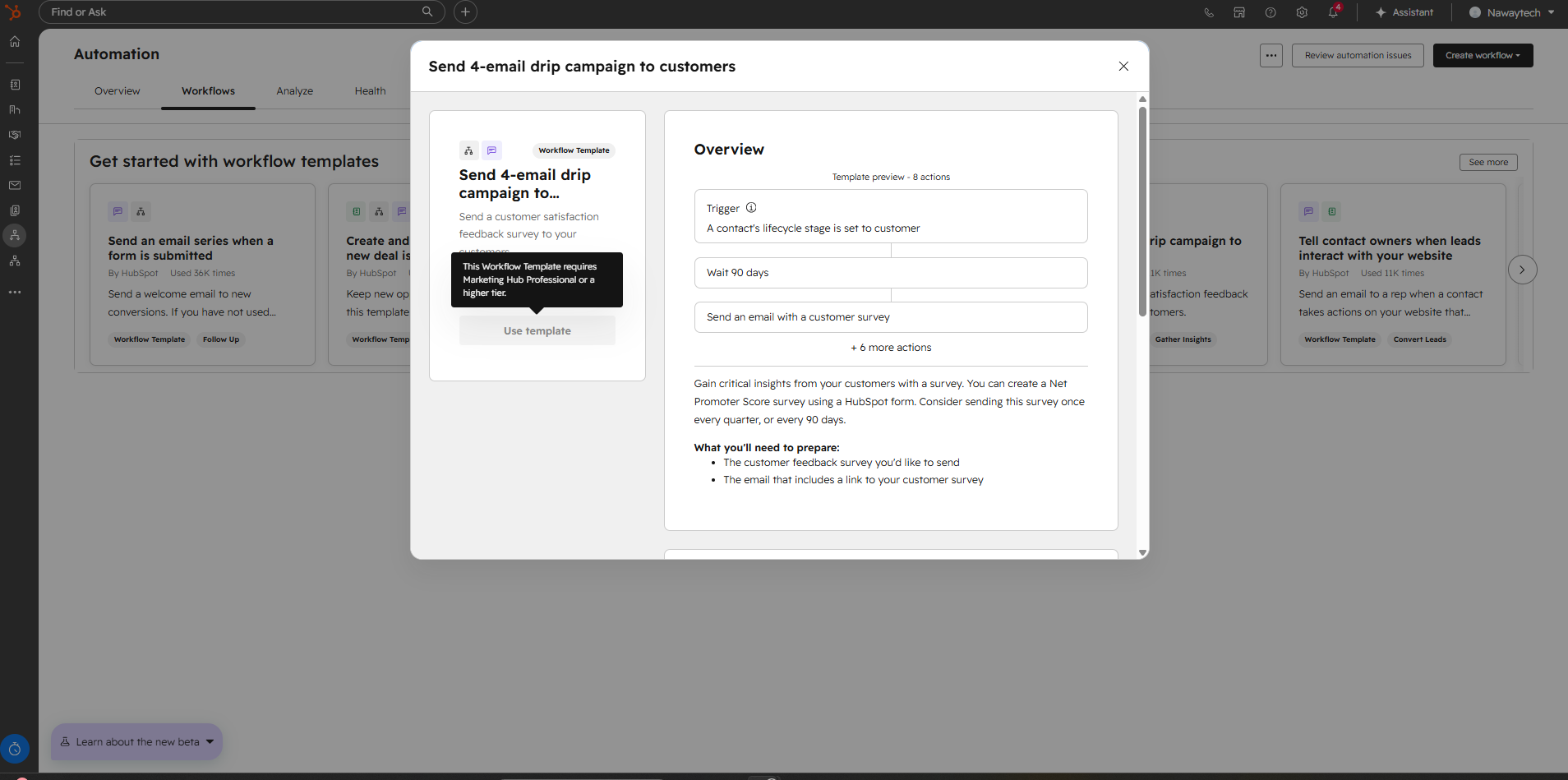
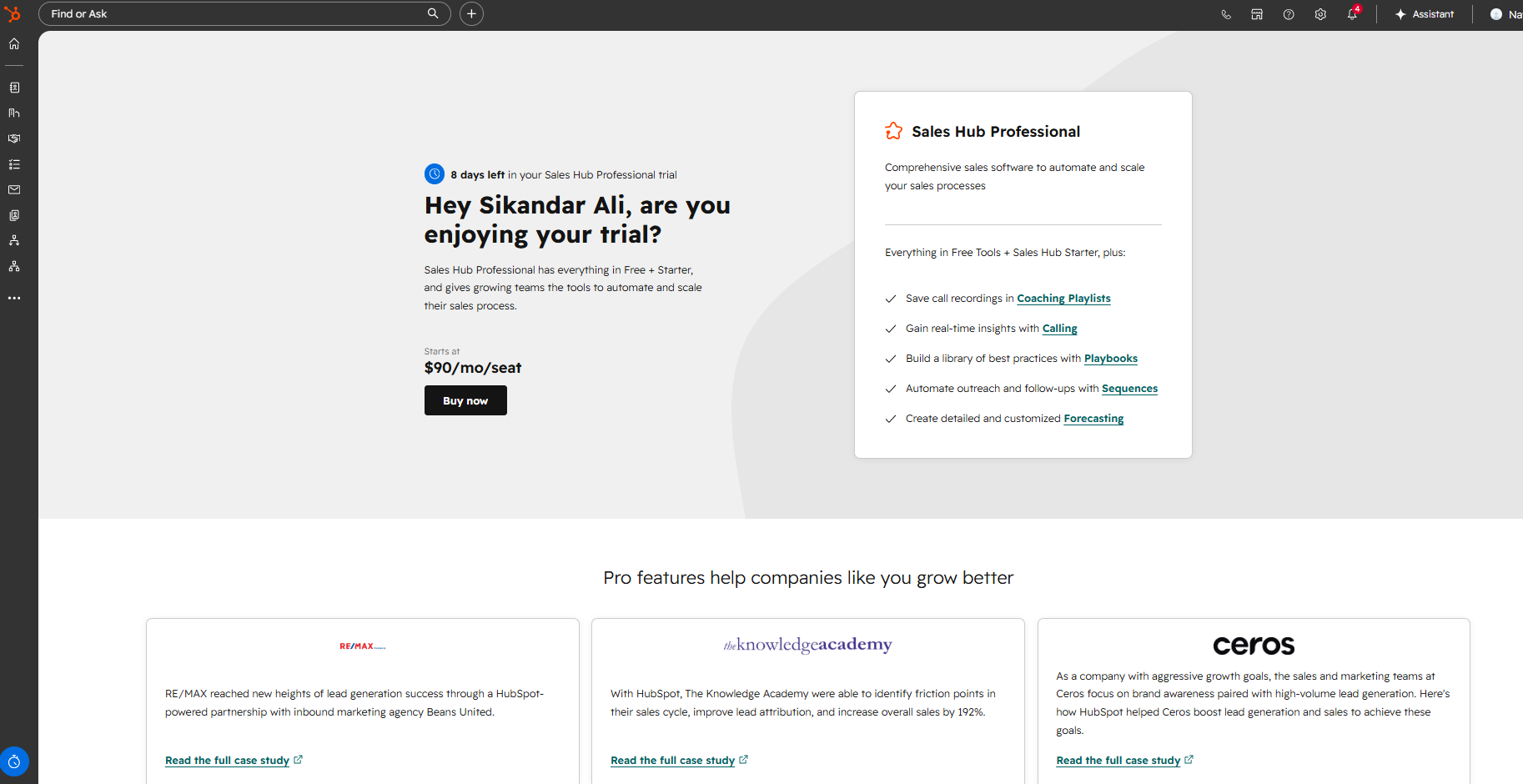
One more automation nuance worth getting right, because it's commonly stated too broadly: HubSpot doesn't gate all automation behind one paywall. Basic workflows are available on lower tiers. What's gated are specific things — multi-step nurture templates require Marketing Hub Professional, and Sequences (the 1:1 sales follow-up) require Sales Hub Professional at $90/seat/month. HubSpot's own upgrade screen spells that out.
Pricing: read the fine print, not the headline
Both start more affordably than their reputations suggest, and both climb.
HubSpot has a real free tier and a low-cost Starter. The jump that matters for sales teams is Sales Hub Professional at $90/seat/month — the tier where Sequences unlock, per HubSpot's own upgrade card.
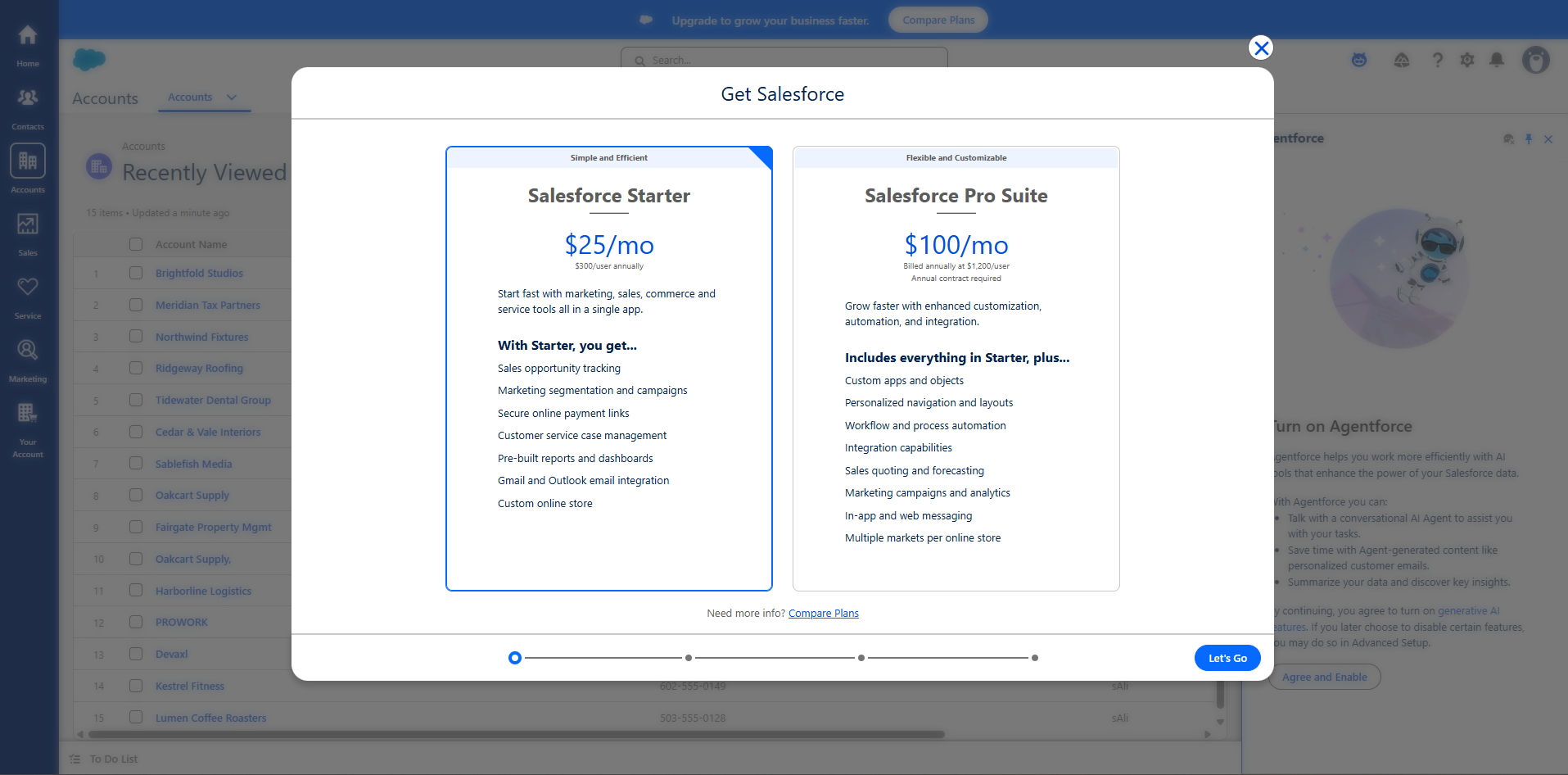
Salesforce Starter is $25/user/month, and Pro Suite is $100/user/month. But here's the catch the headline hides: Starter can be billed monthly or annually, while Pro Suite is billed annually with an annual contract required — and the in-app upgrade screen puts a number on it: $1,200 per user per year. So the moment you outgrow the entry tier, you're signing a year-long commitment, not paying month to month.
And then there's the line I haven't seen a single comparison mention. On Salesforce's own Small Business pricing page, under both the $25 Starter and the $100 Pro tiers, sits four small words: "Starting price. Transaction fees apply." So the advertised price isn't the price — it's a floor, and Salesforce is quietly telling you so on the same card as the number. For a small team trying to forecast its software bill, "starting price plus transaction fees" is a very different promise from a flat per-seat rate. It's the kind of detail that only shows up when you actually read the page instead of the ad.
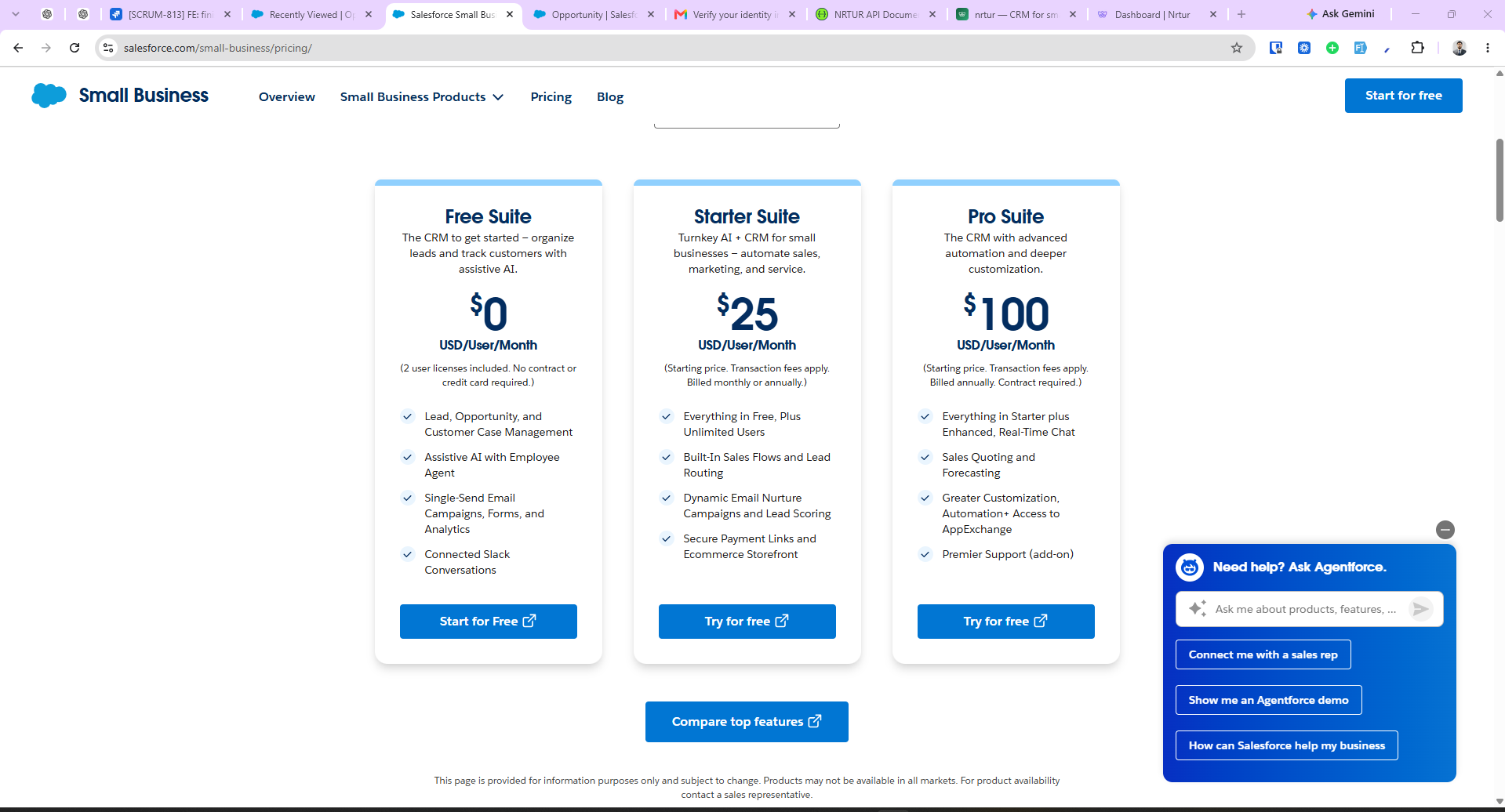
(Pricing here is cited to archived copies of each vendor's own pricing pages — see the note at the end — so the figures stay verifiable even as the live pages change.)
Ease of use, customization, and who each is really for
Strip away the marketing and the split is consistent with everything above:
- HubSpot is built to be self-serve. Most teams run it without a consultant, the free tools let you start today, and the sales/marketing handoff is genuinely well built. Its ceiling is real but you'll rarely hit it as a small team.
- Salesforce is the deepest, most configurable CRM in the category — custom objects, Flow automation, forecasting, and the enormous AppExchange ecosystem. That power is exactly why it's heavier to set up and usually needs an admin or a partner. If your process is genuinely complex, nothing here fully replaces it.
If "we don't have anyone to run the CRM" describes you, that points hard at HubSpot. If you have dedicated sales ops and a process that a simpler tool can't model, that points at Salesforce.
What to look for in any CRM
Both of these are platforms — powerful, but heavier than a small sales team often needs. If you're comparing them and quietly wondering whether either is more than the job requires, the evaluation criteria are the same whatever you choose:
- Where automation is gated. The tier that unlocks the sequences and workflows you actually need is your real price, not the entry price.
- Total cost, including the fine print. Onboarding fees, annual lock-in, "transaction fees apply," paid support, AI add-ons. Add them up before you sign.
- How much structure you're forced to enter just to save a record — and whether that's discipline your team wants or friction it'll resent.
- Whether your losses stay visible, or drop off the board the moment a deal dies.
- Time to a working setup — hours, not a partner engagement.
- A data model that separates who someone is from where they are in your pipeline.
That last cluster — automation included rather than gated, flat and predictable pricing, a setup measured in minutes — is the gap nrtur was built to fill for teams of 1–20+ who found both giants heavier than the work required (flat per-seat pricing: Solo $9, Starter $29, Pro $59, Business $99, with automation and sequences included and no annual lock-in). It won't do what Salesforce does for a 500-rep org, and it doesn't try to. For the wider field, see the best CRM for small teams roundup; if Salesforce specifically feels like too much, the best Salesforce alternatives guide covers six options in depth.
FAQ
Is HubSpot cheaper than Salesforce? Usually, for a small team. Both start low (HubSpot free/Starter, Salesforce Starter $25/user), but HubSpot's total cost tends to be lower once you factor in Salesforce's annual contract above Starter ($1,200/user/year for Pro Suite) and the "transaction fees apply" fine print on its own pricing page. At the enterprise end, where you're buying Salesforce's depth, the calculus shifts.
Is Salesforce harder to set up than HubSpot? To find your way around, yes — automation alone took eight steps to reach in Salesforce versus three in HubSpot, and Salesforce makes you fill five fields to save a deal versus HubSpot's one. But raw speed to create a deal was nearly identical (about 38 vs 35 seconds), and both push you through a long, AI-assisted onboarding before you reach a pipeline. Salesforce is more complex, not universally slower.
Is Salesforce too complex for a small business? It can be. The power comes with a setup and administration burden many small teams don't have capacity for — the most common reason they pick something simpler. Its Starter tier targets smaller teams, but the platform's depth still leans enterprise, and defaults like the missing Closed Lost column assume you'll do reporting work yourself.
Which is better for sales and marketing together? HubSpot, clearly, for a small-to-midsize team — its Marketing Hub and the sales/marketing handoff are tightly integrated and approachable. Salesforce can do it, but usually through additional clouds and configuration.
Does Salesforce really require an annual contract? Above the Starter tier, yes. Salesforce's own upgrade screen states Pro Suite is billed annually at $1,200/user with an annual contract required. Starter can be billed monthly; the lock-in starts when you step up.
Setup, pricing, and product details for HubSpot and Salesforce are from hands-on testing in a HubSpot Sales Hub Professional trial account and a Salesforce Starter trial, plus each vendor's own pricing screens, captured August 2026. Salesforce's figures ($0 / $25 / $100, "transaction fees apply," and the Pro Suite annual-contract terms) are cited to an archived copy of Salesforce's Small Business pricing page (archived August 2026), so they stay verifiable as the live page changes. HubSpot's $90/seat Sales Hub Professional figure is taken from HubSpot's own in-app upgrade screen shown during our trial; its public marketing page currently runs promotional, Revenue Hub–branded pricing, so we cite what the product itself displayed. Where a figure couldn't be confirmed against a primary source, it's stated in general terms.